- JavaScript 38.2%
- PHP 37.1%
- CSS 16.1%
- Shell 8.6%
| Filename | Latest commit message | Latest commit date |
|---|---|---|
 06f36f3c64
Adds the two scripts this repo was missing so the QR Code Maker matches lrob-cookie-consent and lrob-email-toolkit: - deploy.sh — ships the built zip to the test site over SSH via wp-cli. - publish.sh — tags, creates the Forgejo release, uploads the zip. Both are byte-identical to the cookie-consent originals apart from the plugin slug, the header comment and the LROB_QRM_REPO_URL / _GIT_REMOTE constant names — keep them that way. .deploy.conf holds host names and server paths, so it is gitignored and excluded from the release zip (the Forgejo repo is public). CLAUDE.md documents "three scripts, three jobs" plus the two Plesk quirks already solved in deploy.sh's remote(), so they don't get re-derived: the non-interactive ssh PATH resolves `wp` but not `php`, and Plesk's vendored wp-cli deprecation spam is filtered by file path because `php -d error_reporting=` does not work. It also gains a RELEASE GATE section, which publish.sh's translation-gate failure message points at. The .pot change is only its regenerated timestamp. Co-Authored-By: Claude Opus 5 (1M context) <noreply@anthropic.com> |
||
| admin | ||
| assets | ||
| languages | ||
| src | ||
| vendor/qr-code-styling | ||
| .gitignore | ||
| CLAUDE.md | ||
| deploy.sh | ||
| LICENSE | ||
| lrob-qrcode-maker.php | ||
| publish.sh | ||
| README.md | ||
| release.sh | ||
| uninstall.php | ||
📱 LRob — QR Code Maker
Self-hosted, privacy-first QR code generator for WordPress.
Drop a Gutenberg block on any page so your visitors design and download their own QR codes — or keep a personal library of trackable QRs in the admin. Every pixel is rendered in the browser; the server only stores metadata and handles the optional tracking redirect.
📸 At a glance
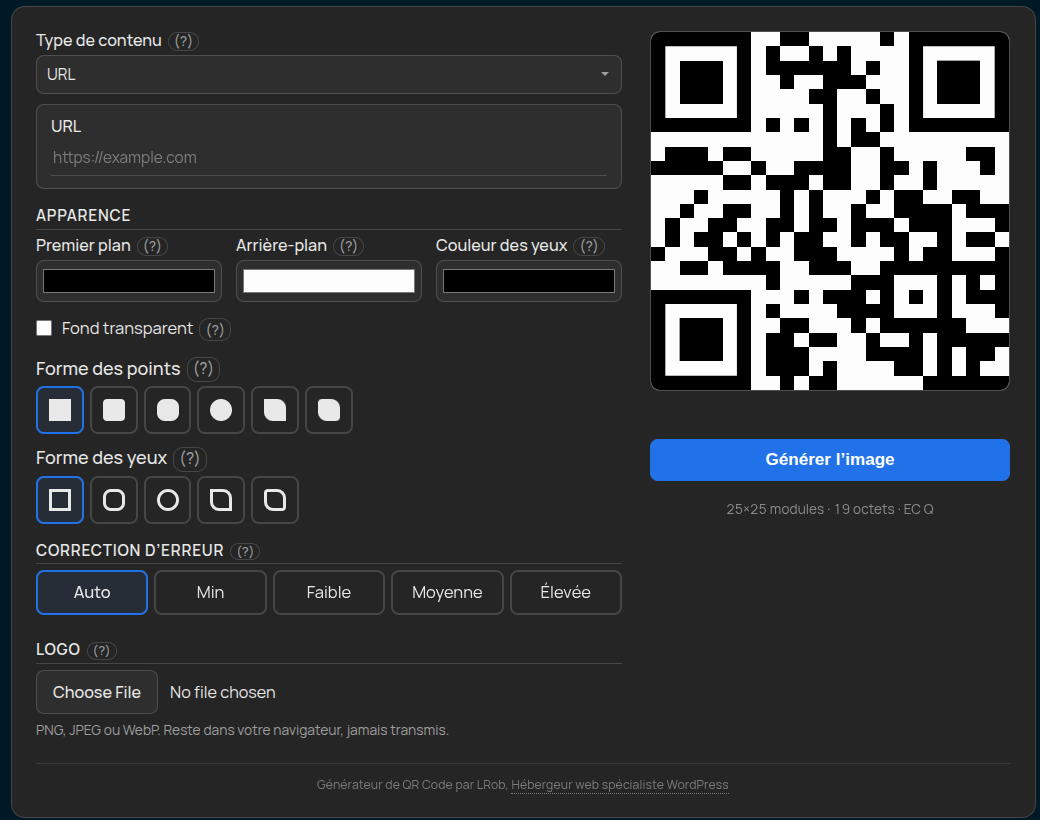
Public Gutenberg block — visitors design + download their own QR |
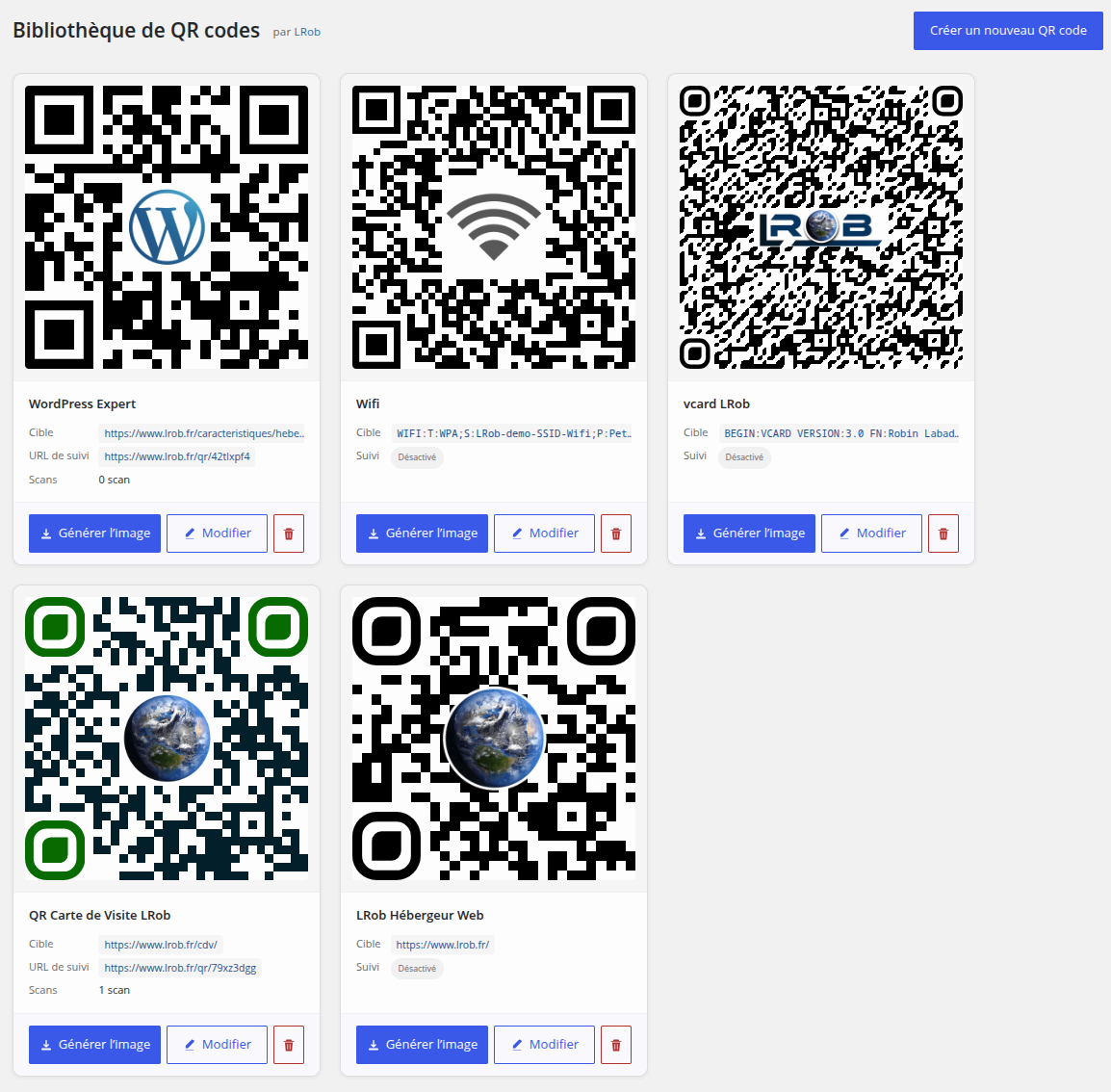
Admin library — every saved QR at a glance |
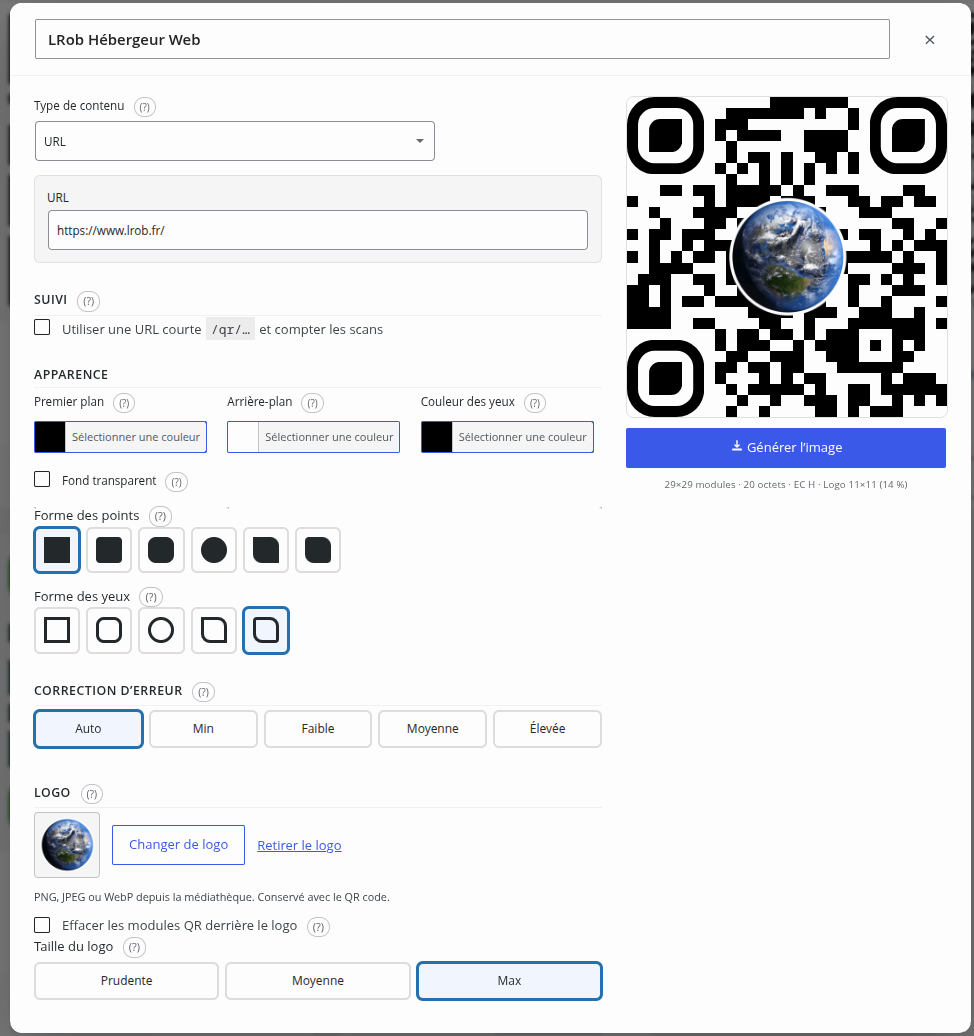
Admin editor — autosave, live preview, every design knob |

Export modal — WebP / PNG / JPEG, 256 → 8192 px |







💡 Skip the QR SaaS. Own your QR codes.
Every other QR generator out there asks you to ship visitor traffic and scan analytics through their domain, their dashboard, their monthly bill. When they raise prices, sell to a private-equity firm, or shut down — your printed QR codes die with them.
This plugin does the opposite. Trackable URLs live on your-site.com/qr/abc. Scan logs land in your WordPress database. There is no API key, no monthly tier, no per-scan fee, no third-party processor in the contract. Install once, own it forever.
🎯 Who is this for?
🏢 Web agencies & freelancersCentralise QR codes for every client site you run.
|
🍽️ Hospitality & retailMenu codes, Wi-Fi codes, table-side ordering — done.
|
📊 Marketing & growth teamsCampaign tracking that respects your visitors.
|
🏠 Real estate, events, conferencesConnect physical to digital, on your terms.
|
🔐 Privacy-sensitive organisationsPublic sector, healthcare, education, EU SMEs.
|
🛠️ WordPress developersPlug it in, hook it, move on.
|
🚀 What you can build in 5 minutes
Restaurant — a public page where customers grab a QR linking to your seasonal menu, in your brand colours, with your logo. Print it once, update the menu URL without reprinting.
B2B agency — a private admin library of every client's marketing QR codes. One scan counter per campaign. Bill clients on real numbers, not on a SaaS subscription.
Conference — speaker vCards as QRs on each badge. Attendees scan, the contact lands in their phone book. No mailing list signup friction.
SaaS landing page — a "Get the mobile app" QR with your iOS/Android store link, tracked so you see how many visitors actually scan vs click.
Coworking space — a Wi-Fi QR at reception. Hidden network, WPA2 password. Members scan and connect — guests don't get the password verbally.
Real estate listings — every property page has a QR to the virtual tour. The agent sees in WP which properties got scanned most that week.
✨ What's inside
| 🧠 All rendering client-side | Powered by qr-code-styling — no PHP imaging library, no GD pipeline, no REST render endpoint. Preview and export come from the same code path, so what you see is what you get. |
| 🔒 Privacy-first by design | Visitors' logos never leave their browser. Tracking only stores a per-QR hit counter — no IP, no user-agent, no referer, nothing per-visitor. No SaaS, no third-party scripts, no callbacks home. |
| 🎨 Genuinely customisable | 6 dot shapes, 5 eye shapes, free colours per element, optional logo with density-aware error correction (Auto + 4 forced levels, aspect-aware safe-area calc), 5 themes (incl. FSE inheritance + fully custom), 3 layouts. Every form field has a detailed hover-help tooltip. |
| 📇 Eight content types | URL · Plain text · vCard · Wi-Fi · Email · SMS · Phone · Geolocation. Compose the payload from typed fields — the encoded BEGIN:VCARD / WIFI: / mailto: string is built client-side. |
| 📤 Export formats | WebP (default), PNG, JPEG. Sizes 256 → 8192 px, plus custom for print. |
| 📈 Tracked redirects | Optional per QR — available for URL, plain text and vCard content types (others encode native schemes scanners read directly, an HTTP redirect would break them). https://yoursite.com/qr/<slug> → 302 to target + counter bump. Default URL prefix configurable. |
| 🪶 Lightweight | No Composer at runtime, no JS build pipeline. One vendored library. |
| 🔄 Self-hosted auto-update | Plugin updates pulled directly from our own Forgejo releases. No wordpress.org dependency. |
| 🌍 Localised | English source, 🇫🇷 French at 100%. Drop a .po next to it for any locale you need. |
🆚 vs. the QR SaaS landscape
| This plugin | Typical QR SaaS | |
|---|---|---|
| Cost | One-time install, free forever (GPL) | $5–$50 / month, scaling with scans |
| Tracking URL | yoursite.com/qr/... |
their-domain.com/yourcode |
| What happens if they shut down | Nothing | Your printed QRs become 404s |
| Where the data lives | Your WordPress database | Their cloud, often outside the EU |
| GDPR compliance | No third-party processor | You add them to your DPA |
| Custom branding | Full control, white-labelable | Often "Pro" tier only |
| Logo upload privacy | File never leaves visitor's browser | Uploaded to their servers |
| Auto-update | From our own server, on your timeline | Forced on theirs |
🚀 Quick start
1. Install
From a release (recommended)
- Download
lrob-qrcode-maker-<version>.zipfrom the Releases page. - WordPress admin → Plugins → Add New → Upload Plugin → pick the zip → Activate.
From source
git clone https://git.lrob.net/WP/qrcode-maker.git
cd wp-lrob-qrcode-maker
./release.sh                                     # produces ../releases/lrob-qrcode-maker-<version>.zip
2. Add the public block
In the block editor, insert QR Code Maker (category Widgets). Visitors land on a live maker with preview, design controls, and a Generate image action. Configure defaults (colours, theme, layout, content type) from the Inspector sidebar.
3. Build a tracked QR in the admin
Go to QR Codes → Library → Create new QR code, fill it in, tick Tracking (available for URL / text / vCard), save. The QR encodes https://yoursite/qr/<slug> instead of the raw payload. Each scan bumps the counter shown on the card — no per-visitor data is stored.
That's it. No external account. No configuration step.
📦 Feature deep-dive
Public Gutenberg block — lrob-qrm/maker
A drop-in maker UI visitors interact with directly.
- Live preview that doubles as the export source (preview = export, guaranteed).
- Pre-seeded design — block authors set the default colours, shapes, content type and theme in the Inspector sidebar. Each block instance can be configured independently.
- No data leaves the browser. Logo files are read via
FileReaderand passed in-memory to the renderer. - Mobile-first responsive layout; collapses to a single column under 720 px.
Admin library
A card grid of reusable QR codes with a modal editor.
- Card thumbnails are rendered live in the grid (qr-code-styling at 240×240).
- One-click Generate image / Edit / Delete per card.
- Autosave on every form input (1 s debounce, in-modal status indicator) — no save button to forget.
- Incremental grid refresh when the editor closes: only the new/edited card is replaced or appended, no full-page reload.
- Stored QRs preserve their content type + raw input values in the design JSON, so editing later re-opens the original form (vCard fields, Wi-Fi creds, etc.) rather than the composed payload.
- Modal opens with a quick fade-in animation; on screens ≤ 800 px it goes full-bleed for usable mobile editing.
Per-QR scan tracking
Opt-in per QR. Available only for URL, plain text and vCard content types — other types (Wi-Fi, email, SMS, tel, geo) encode native schemes the phone's scanner acts on directly; an HTTP redirect would drop the scheme and break the QR, so the checkbox is locked for those types.
When enabled:
- The QR encodes
https://yoursite/<tracking_path>/<slug>(defaulttracking_path = qr, configurable in Settings). - Hitting that URL bumps the per-QR counter (a single
UPDATE codes SET scan_count = scan_count + 1) and 302s to the real target. No row inserted per scan — no IP, no user-agent, no referer is ever stored. - vCard payload (
BEGIN:VCARD…) is served as a downloadable.vcffile (Content-Type: text/vcard,Content-Disposition: attachment) so the phone prompts Add to Contacts. The recommended path for vCard QRs that wouldn't otherwise scan reliably inline — encoding a short/qr/<slug>URL fits in any scanner, and serving the contact as a real file works on every phone. - Plain text payload is rendered as a minimal
noindexlanding page so search engines don't archive the content of tracked text QRs.
Export modal
Opened by every Generate image button (cards + designer). Holds:
- Size select with preset standards (256 / 512 / 1024 / 2048 / 4096 — powers of 2) + Custom up to 8192 px.
- Format select: WebP (default), PNG, JPEG. All three are encoded natively by
qr-code-styling's canvas pipeline. - Live preview at modal size so big-resolution exports still feel responsive.
Content types
| Type | What it encodes |
|---|---|
| URL | A web URL (https://…) |
| Plain text | Free-form text |
| Contact (vCard) | Name, organisation, title, email, phone, website, address → BEGIN:VCARD v3.0 |
| Wi-Fi network | SSID, password, WPA/WEP/none, hidden flag → WIFI:T:WPA;S:...;P:...;; |
Recipient, subject, body → mailto:to?subject=&body= |
|
| SMS | Phone, message → sms:+...?body=... |
| Phone call | Phone → tel:+... |
| Geolocation | Latitude + longitude → geo:lat,lng |
Adding a new type is a single-class change — see src/Support/ContentTypes.php + the matching JS composer in assets/js/content-types.js.
Themes (5)
- Auto (default) — follows the visitor's
prefers-color-scheme(light or dark, automatic). - Light — white shell, dark text, blue accent.
- Dark — anthracite shell, light text, same accent.
- Inherit from site theme (FSE) — maps the maker colours to the site's WordPress block theme palette via
--wp--preset--color--background / --foreground / --primary / --secondary. Falls back to defaults on classic themes. - Custom — six colour pickers in the Inspector: surface, soft surface (cards), input background, text, muted text, accent. Injected as inline CSS variables on the shell.
Layouts (3)
- Preview right (default) — form left, QR + Export button right.
- Preview left — QR + Export button left, form right.
- Stacked — preview on top, form below (one column, mobile-friendly).
Shapes
| Element | Options |
|---|---|
| Dot shape | Square · Rounded · Extra rounded · Dots · Classy · Classy rounded |
| Eye shape | Square · Extra rounded · Circle · Classy · Classy rounded |
| Eye inner dot | Auto-derived from the outer eye choice |
Logo handling
- Public block: file picker. Image stays in the browser (FileReader → dataURL → qr-code-styling).
- Admin library: WordPress Media Library picker. The logo persists on the QR row (attachment ID).
Error correction + logo coverage
Two pill-row controls on each QR — both with hover-help tooltips that explain the trade-off in plain language.
Error correction (Auto | Min | Low | Medium | High → maps to auto | L | M | Q | H):
- Auto (default) — when no logo is attached, picks the highest EC that fits at the same QR version as
L(so bumping EC doesn't bloat the matrix). When a logo IS attached, picks the EC that maximises the safe logo area for the chosenLogo sizepreset. - Forced levels — keep the requested level; fall back to the next lower one only if data overflows v40 at the chosen EC.
Logo size (Safe | Medium | Max → multiplier on the computed safeArea):
- Multipliers
{safe: 0.5, medium: 0.8, max: 1.0}applied to the density-aware safe area computed for the chosen EC + payload + logo aspect. safeAreaderives from the proper Reed-Solomon block structure (ISO/IEC 18004:2015 Annex D Table 9). For a QR at versionVand EC levelEwithblocksRS blocks ofeccPerBlockcodewords each:rsBudget = (totalEC × 8 × RS_SAFETY) / (totalModules × √blocks). The√blocksfactor scales for centred-logo damage concentration — a logo's modules don't distribute evenly across RS blocks, so the theoretical recovery budget is over-optimistic without it.- A linear scanner cap
dimCap = 0.55² / aspectclamps wide / tall logos whose longest side would exceed 55% of the QR — scanners struggle past that regardless of RS budget.safeArea = min(rsBudget, dimCap). - Single empirical knob
RS_SAFETY = 0.54, calibrated to fit two scan-failure boundary points within ~1 pp. NoversionFactorhack, no per-EC scaling fudge — the proper RS tables handle per-version variance directly.
The pipeline lives in assets/js/qr-engine.js, shared between admin + front block.
Stats line under the preview shows: {modules}×{modules} modules · {bytes} bytes · EC {level} plus, when a logo is set, · Logo {w}×{h} ({coverage}%) where w × h is the actually rendered logo size in QR modules and coverage is its real area fraction (mirrors qr-code-styling's odd-module quantization rather than the target the user requested).
A scanner-compat notice appears at two byte thresholds:
- > 512 bytes — "the QR gets dense, print it at ≥ 4 cm for reliable scans".
- > 1024 bytes — "may be unscannable on many phones, shorten the content".
For vCard payloads at either threshold, the notice suggests enabling Tracking so the QR encodes a short /qr/<slug> URL and the contact card is served as a downloadable .vcf when scanned (works on every scanner regardless of byte count or accents).
Export formats
| Format | Notes |
|---|---|
| WebP (default) | Best size/quality trade-off. |
| PNG | Lossless, supports transparency — pick this if you set a transparent QR background. |
| JPEG | Smallest for opaque codes, no alpha. |
SVG is intentionally not offered. SVG can carry scripts; allowing visitors to host an SVG produced by your site would expand the attack surface for no real benefit.
⚙️ Settings
QR Codes → Settings:
| Setting | Default | Effect |
|---|---|---|
| Tracking URL prefix | qr |
First path segment of tracked URLs (e.g. /qr/abc123). Change to /go/, /r/, etc. |
| Default export size | 1024 |
Pre-fills the Export modal. |
| Default export format | webp |
Pre-fills the Export modal. |
| Uninstall behaviour | keep |
What happens when the plugin is deleted from WP admin (see below). |
Uninstall modes
| Mode | What it drops |
|---|---|
| keep (default, safest) | Nothing. Reinstalling picks up where you left off. |
| archive | Plugin options + capability + cron. Keeps QR codes (target, design, counter). |
| wipe | Everything (tables, options, capability, cron). |
The keep default means a misclick on WP's Delete button cannot lose data.
🔐 Privacy & security
- No third-party callouts. Everything runs on your server (or your visitor's browser). The plugin makes one outbound request: a daily release check on git.lrob.net for self-update — that's it.
- No upload pipeline for visitor logos. The public block reads the file via
FileReaderand composites it client-side via canvas. The file never reaches your server. - Admin logos are regular WP Media Library attachments, governed by your existing permissions. The render endpoint that reads them is cap-checked (
manage_lrob_qrm) and MIME-restricted toimage/png | image/jpeg | image/webp. - Zero per-visitor data on scans. The tracking endpoint executes a single
UPDATE codes SET scan_count = scan_count + 1and a 302 — no IP, no user-agent, no referer, no cookies, no fingerprinting. (Thewp_lrob_qrm_scanstable from earlier versions, which logged anonymised IPs, is dropped on install: it was never surfaced in the UI and the high-volume scenario — stadium menus, conference rooms, public Wi-Fi — would have bloated it with thousands of rows sharing the same anonymised IP anyway.) - Tracking restricted to URL / text / vCard. Native-scheme content (Wi-Fi, mailto:, sms:, tel:, geo:) cannot be tracked — the checkbox is disabled and existing legacy data is left intact but flagged. An HTTP redirect would drop the scheme and break the QR for the scanner.
- Opaque tracking URLs. Slugs are 8-char base36 (~2.8 × 10¹² combinations), uniqueness-checked at allocation. There's nothing sensitive in the URL — just an opaque key the server resolves.
- Permission gate: every admin endpoint is gated by
manage_lrob_qrm(granted toadministratoron activation) plusX-WP-Nonce.
🏗️ Architecture (in 30 seconds)
┌─────────────────────────────────────────────────────────────────┐
│                         Browser (you)                            │
│   qr-code-styling — preview + export, all shapes, logos, gradients
│                                  ▲                               │
│                                  │ Same engine for preview + export
└──────────────────────────────────┼───────────────────────────────┘
                                   │
       ┌───────────────────────────┼───────────────────────────┐
       │                           │                           │
       ▼                           ▼                           ▼
  Gutenberg block          REST /lrob-qrm/v1/library      Tracking redirect
  (server-rendered          (admin CRUD only —             /qr/{slug}
   shell + JSON              no render endpoint            (rewrite rule +
   config)                   exists by design)             302 + counter++)
       │                           │                           │
       └───────────────────────────┴───────────────────────────┘
                                   │
                                   ▼
                          PHP 8.3+ on WP 6.0+
                  (no PHP image library, no Composer)
- Entry point (
lrob-qrcode-maker.php): defines constants, registers a hand-rolled PSR-4 autoloader for plugin code, bootsPlugin::instance()->boot()onplugins_loaded. - Subsystems (all wired in
Plugin::boot()):Block\Maker— registers thelrob-qrm/makerGutenberg block.REST\LibraryController— admin-only CRUD over saved QRs (the only REST surface).Tracking\Router—/qr/{slug}rewrite + redirect + hit counter.AutoUpdate\Updater— surfaces Forgejo releases as WordPress plugin updates.Admin\Menu— top-level QR Codes menu with Library + Settings submenus.
- Trust boundary: admin writes pass
LibraryController::sanitize_payload()(URL length cap, design JSON flattened to scalars + 1-levelcontentValuesmap, logo_attachment_id verified against the attachment + MIME). Tracking redirects clamp the slug to[a-z0-9]{1,32}via the rewrite regex.
Full deep-dive: see CLAUDE.md.
🛠️ Requirements
- PHP 8.3+
- WordPress 6.0+
- Modern browser with JavaScript enabled (for the maker UI)
- Pretty permalinks (Settings → Permalinks) if you want the
/qr/{slug}tracking endpoint
🌍 Languages
| Locale | Coverage |
|---|---|
| 🇬🇧 English (source) | 100 % |
🇫🇷 French (fr_FR) |
100 % |
Adding a locale: drop lrob-qrcode-maker-<locale>.po into languages/ and run ./release.sh. The .pot is regenerated and your .po merged automatically.
🧑💻 Developer notes
Build
./release.sh                       # lints, regenerates translations, zips the release
./release.sh --refresh-vendors     # also re-downloads the pinned qr-code-styling version
Tests / linting
./release.sh                       # runs php -l on every PHP, node --check on every JS,
                                   # plus a dead-CSS scan with peel-once heuristic
No PHPUnit yet — feature-tested manually via the WordPress admin. Linting is enforced by the release script (it refuses to package on syntax errors).
Extending content types
- Add a key to
ContentTypes::definitions()(src/Support/ContentTypes.php) — label + fields list. - Add a
caseto thecompose()switch inassets/js/content-types.js— produce the encoded string. - Done — both admin + frontend pick the new type up via localised config.
Extending shapes
qr-code-styling's dotsOptions.type and cornersSquareOptions.type define the wire values; the lists at the top of assets/js/maker.js (and the DOT_SHAPES / EYE_SHAPES consts in src/Admin/LibraryPage.php) drive the UI. Adding a shape = one entry in each + a CSS icon class.
💬 Feedback & contributions
Bug reports, feature ideas and pull requests welcome on the issue tracker.
📜 License & credits
Plugin code: GPL-2.0-or-later. See LICENSE.
Vendored libraries
| Library | Author | License | Role |
|---|---|---|---|
| qr-code-styling | Denys Kozak (@kozakdenys) | MIT | Browser-side QR rendering — preview AND export. This plugin would not exist in its current form without it. |
Upstream notices are preserved verbatim in vendor/qr-code-styling/LICENSE.
Built by
LRob — WordPress web hosting specialist based in Orléans, France.
- 📦 Plugin home: https://www.lrob.fr/wordpress/plugins/qr-code-maker/
- 🐛 Issues: https://git.lrob.net/WP/qrcode-maker/issues
- 💼 Hosting service: https://www.lrob.fr
Powered by visitors' browsers. Hosted on your terms. No SaaS.